
What answer do you need from the scan?
Imagine a documentary archive with camera originals on one disk and screening copies on another. The producer wants to retire obsolete exports. The editor wants the shot of a hand passing a photograph across a table. Both requests concern the same footage, but they call for different evidence. For the producer, collect the paths to both versions and check what each contains. For the editor, find the gesture and enough footage on either side to make the cut.
| Task | Czkawka / Krokiet | MediaDNA Library |
|---|---|---|
| Find exact copies | Use Duplicate Files with hash comparison. | Search for full visual matches to include copies that have also been re-encoded. |
| Compare deliveries with masters | Mark the masters as a reference folder in Similar Videos. | Index both locations and inspect the paths in each full-video duplicate group. |
| Investigate a shared opening | Compare windows sampled at different positions. | Open the candidate passage to check the scene, or review a whole-video match. |
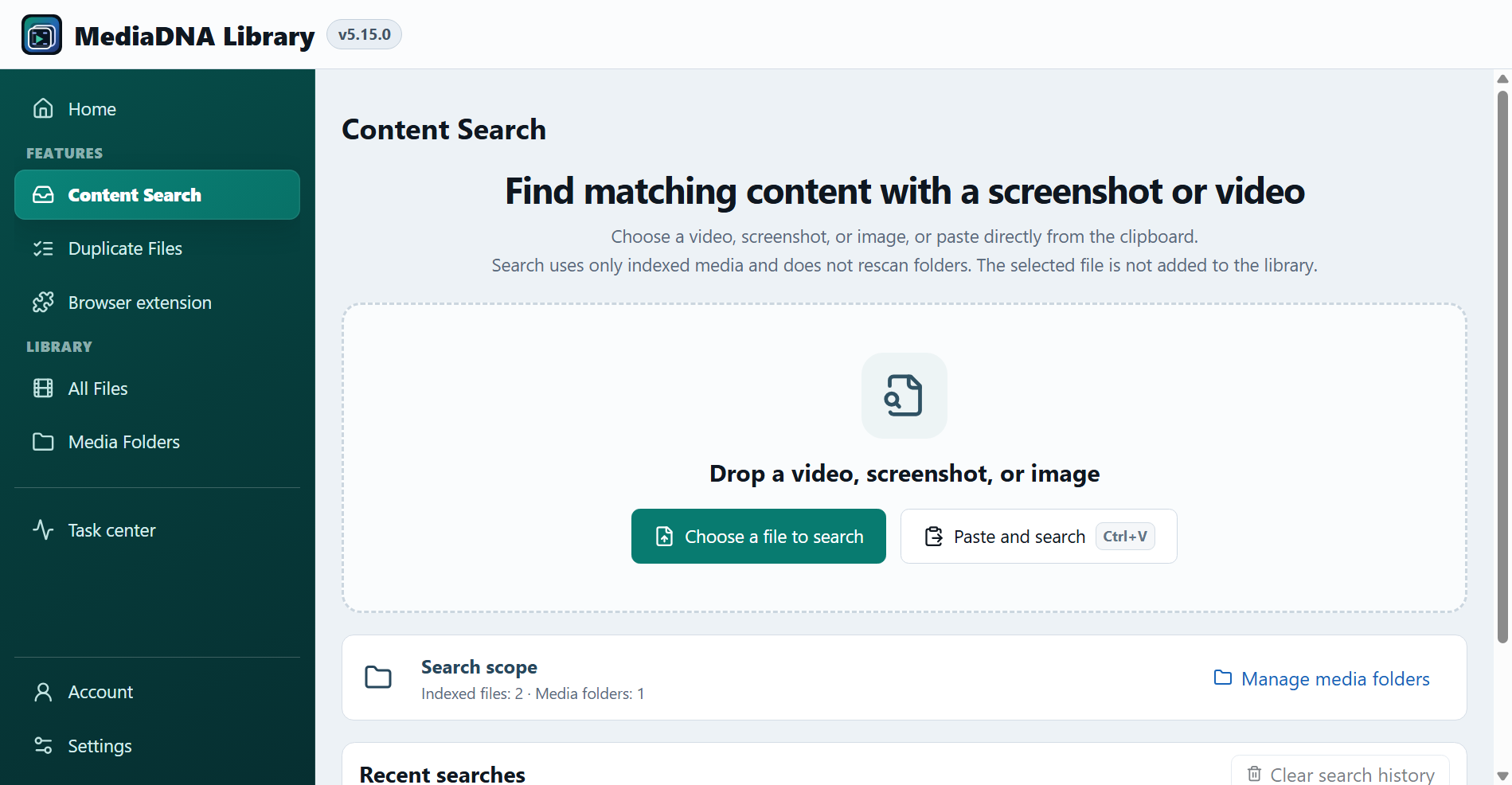
| Find a source from a screenshot | The Similar Videos workflow starts with folders of videos. | Paste the frame into Content Search, preview a candidate and open the source. |
Protect the master folder before reviewing a delivery
In Krokiet, the graphical interface recommended by Czkawka, put the masters and the delivery folder in the scan. In Included paths, tick Ref beside the masters. Files inside the reference folder are available for comparison and protected from cleanup actions. The delivery copies remain available for selection. Check the path labels before scanning, especially if a backup disk uses the same folder names as the working disk.
A reference scan answers a narrower question than a scan of the entire collection. A pair found only inside the delivery folder has no reference member, so it can disappear from this view. If the producer also wants to find repeats within the delivery, run a separate scan of that folder with no reference path. Keep the results of those two passes separate so a file with two delivery copies does not accidentally get reported as safely archived on the master disk.
When the results arrive, double-click a file row to play it in your usual player. A highlighted row is the item you are examining. The checkboxes identify the files a move or delete action would affect. Read the checked paths from top to bottom before using either action.
Handle re-encodes and repeated introductions
For a straight file copy with a new name, a hash comparison can settle whether the bytes match. Choose Similar Videos for a screening copy that was resized or re-encoded. Krokiet uses FFmpeg and FFprobe to read the video. If that tool reports a missing dependency, check that both programs are available to the application before changing the similarity settings.
Repeated content deserves a second look. Consider two episodes that open with the same title sequence. If they appear together, play each one after the titles, then compare a scene near the end. In Krokiet you can adjust where sampling starts and how many windows it covers. Try a later starting point on these two episodes and include a known re-encode in the same small scan. The re-encode gives you a check that a setting which separates the episodes still finds a pair you care about.
Use a still or a short excerpt to retrieve the original take
In MediaDNA Local Mode, connect the drives holding the camera folders and add those folders to the library. Once indexed, they can be searched with a frame pasted into Content Search. For the photograph handoff, use a frame with both the photograph and the people in view. A close-up of a blank tabletop could fit many takes. Play each suggested time range and watch how the photograph enters and leaves the frame.
When the editor sends a few seconds from a rough cut, select the video file as the query. After the whole-file check, choose “Continue with section search” when the option appears. A passage in a long recording can explain the origin of a cut while leaving both versions worth keeping. Give the editor the source path and a playback position. Include the drive name when a colleague will have to reconnect removable storage to open the take.
Frequently asked questions
How can I check a whole delivery without treating every match as disposable?
Start with one known master, one complete screening copy and one intentional edit. Confirm that you can open all three. Compare their durations and listen to the tracks the producer expects to deliver. A clean picture master and a subtitled screening file may genuinely contain the same moving images. The captions can make both deliverables necessary. Record that decision alongside the filenames before reviewing the rest of the folder.
Why does the second Krokiet scan take longer after I change a setting?
Krokiet can reuse the video fingerprints it has already calculated. A change to how frames are sampled, such as the window count, can require it to process the videos again. A setting that changes how stored fingerprints are grouped can reuse that work. Try sampling changes on a representative folder first and save the chosen settings before launching a pass over the rest of the archive.
Can I use these workflows with a NAS that is sometimes disconnected?
Mount the share and open a known source file from the scanning computer first. In MediaDNA Local Mode, the index belongs to that computer, including entries for mounted storage. A search can give you a path even when you need to reconnect the share to play the original. If several editors need to query one shared MediaDNA index, the Team Workstation guide covers a different setup with a workstation on the private network.