
Find the shot you remember
Use a screenshot to find candidate videos, file locations and matching time ranges in your own indexed library.

 Photonseed
MediaDNA Library · Desktop footage search for creators
Use a screenshot or clip to find candidate source videos, matching time ranges and file locations in your indexed library. Search footage across your computer, external drives and mounted NAS; your originals stay in place.
7-day free trial for eligible new users
Local processing: feature extraction and search run on your computer.
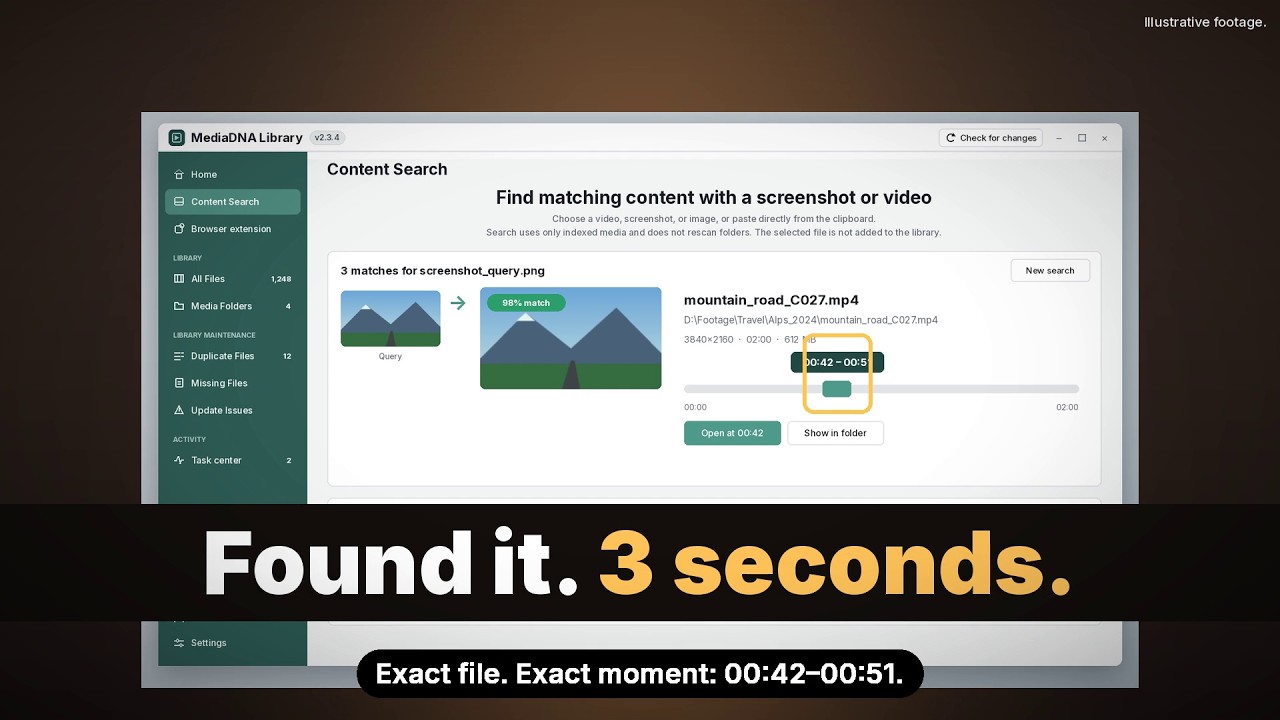 Watch the story · 26s
2:47 AM. The Client Wants ONE Shot | MediaDNA Library
Add your footage folders and finish indexing first. Search stays within your own library.
Illustrative footage and demo interface; not a recording of a real user's library.
Different ways to search the footage you already have. Review the matches, then find the file.
Use a screenshot to find candidate videos, file locations and matching time ranges in your own indexed library.
Compare the complete visual content, even when filenames differ. Audio, subtitle tracks, encoding or picture quality may still differ; review the version to keep before removing anything.
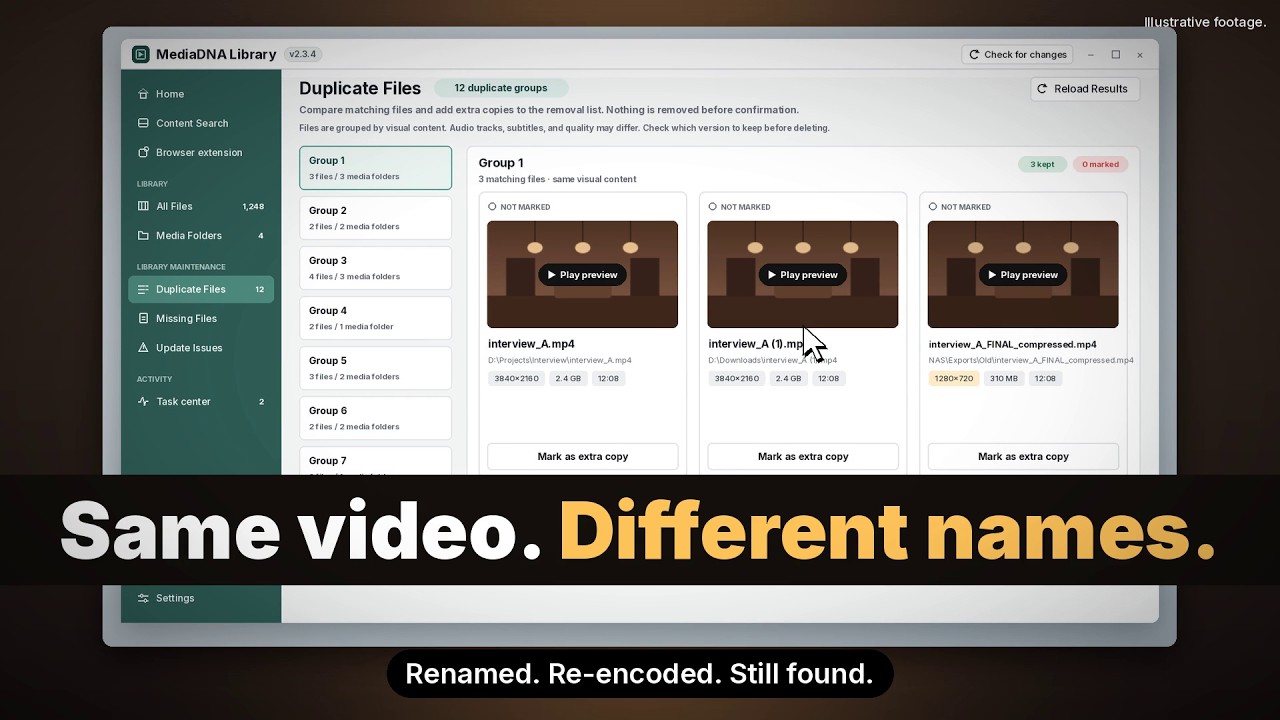 Watch the story · 25s
Disk Full at 97%. Find Duplicate Videos by What's In Them | MediaDNA

Start a file search, then continue with section search to find overlapping footage.

Your footage. Your workflow.
Build an index of your footage, then search it when a project needs a shot you remember.
Add accessible folders from your computer, connected drives or mounted network storage. Keep your originals where they are.
MediaDNA Library prepares a visual index on your computer. Indexing time depends on your footage and hardware.
Search with a screenshot, review candidate videos and matching sections, then open the footage for your edit. Use video-file and section search to compare a clip.
The Chrome/Chromium companion can save supported videos locally and search a frame in your existing library. It requires a compatible desktop build.
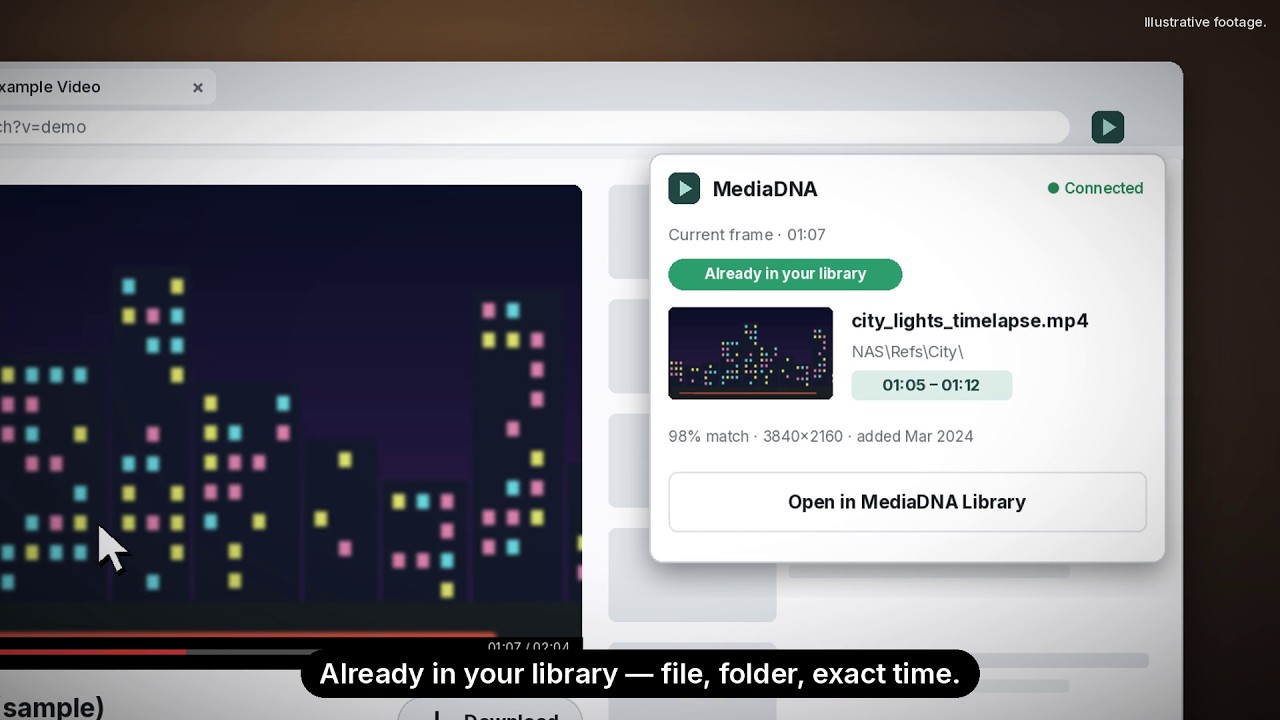 Watch the story · 25s
Didn't I Already Download This? | MediaDNA Chrome Extension
Save a supported web video through Chrome, then have MediaDNA Library check the completed file and add it to your library. Downloads stay at the location chosen in Chrome. If the desktop is not connected, finish importing after you connect it.
Open the tool beside a web video and search its current frame in your local library, without downloading the whole video. See candidate videos in the extension, then open the matching time ranges and previews in MediaDNA Library. You can also explicitly capture the visible page; that image may include other visible content.
Install the compatible desktop app and Chrome extension, then open the app and sign in. The connection is prepared automatically; check its status on Browser extension in the left sidebar and use Repair connection only if it fails. Chrome controls the download location and can keep downloading while the desktop app is closed.
Works with Chrome/Chromium and a compatible, connected MediaDNA Library desktop app.
To find matching files and compare copies, MediaDNA Library looks at the video content. AI visual features and frame structure form a content fingerprint — its media DNA. This gives matching a basis in the footage itself, so you can find candidates even under different filenames and check the results before deciding what to keep.
Feature extraction and matching run locally. Screenshot and clip search use dedicated visual matching to return candidate source videos and time ranges for review.
Free trial
Request a 7-day free trial. Final subscription pricing will be announced at public launch.
7-day free trial
Public launch price to be announced
For eligible new users, the 7-day trial starts when MediaDNA Library is first activated in the desktop app. Paid plans have their own payment and renewal terms, shown at checkout.
DownloadIf you choose a paid subscription, its current price and any taxes are shown at checkout before you confirm payment.
Questions
Yes. MediaDNA Library uses AI visual features and frame structure to find candidate matches, then checks the full visual content before listing duplicates. Similar-looking shots or a shared clip alone do not make two videos duplicates. Duplicate checks compare the full visual content; audio tracks, subtitle tracks, encoding or picture quality may still differ. Review the previews, file locations and the version you want to keep before removing anything.
No. Duplicate review helps you compare copies, but removal requires your selection and confirmation. Network storage may require permanent deletion rather than the system trash; the app explains the action before you confirm.
Media indexing, feature extraction, matching and search all run on your computer. Indexing and search do not upload your original media, query images or content index to Photonseed. See the Privacy Policy for information about account and service data.
Desktop Content Search accepts supported local files and clipboard images, not text prompts or pasted web links. The browser companion can capture a video frame or the visible page and search it in your local library. It needs a compatible desktop app and browser connector.
Choose a screenshot to find candidate videos and matching time ranges in your indexed library. For a clip, start a video-file search and choose to continue with section search. Open the results and review the footage and file location.
MediaDNA Library uses a Photonseed account with Google sign-in for trial access and licensing. Media indexing, feature extraction, matching and search all run on your computer. Sign in online to activate the app, then use these features offline within your license’s offline access period.
MediaDNA Library is being tested on Windows, macOS and Linux. Request a test build with your email; we will discuss availability and how to obtain it. The Request access page explains the application process.
No. The extension supports direct video files and a subset of HLS/DASH on-demand streams. It cannot download live streams or DRM-protected media, and site restrictions may prevent a download. Chrome saves the file; a compatible connected desktop app indexes it. Only save content you have permission to download.
No. Request access with your email first, then install the build when it is available. Eligible first-time users start their 7-day trial when MediaDNA Library is first activated in the desktop app. Signing in on the website alone does not start it. Requesting a build does not start the trial, authorize payment or become a subscription automatically.
No. Final subscription pricing for the public release has not been set; we will announce it when MediaDNA Library launches. You can request a 7-day trial without a card, and it will not charge you automatically. If you choose an optional paid checkout, its current payable price and any taxes are shown before you confirm.
Yes. Add each accessible folder as a media folder and let indexing finish. Original files stay where they are. A disconnected drive or NAS can appear offline rather than missing; reconnect it and update that folder before relying on search results.
Yes. Select the video in Content Search before adding its folder. The query file is not automatically indexed. Review verified full-content matches and their paths; if none appears, check that the relevant sources are indexed and available before deciding to add the file. A browser-frame candidate is not a full-file duplicate result.
Yes. Use All Files for filename or path text search and source filters. In Content Search, select an image or video file, or paste one image or supported media file from the clipboard. Video-file search checks full content first; you can then choose section search to find an overlapping clip.